Saturday, February 7, 2015

Fifty Shades of — oh boy!

It has been a busy, busy, buuuuusy couple of months for me, and I brilliantly decided I would add to my busy-ness by blogging about some of the things that have been making me busy. Because, you know, I can’t afford therapy and blogging is free.

Shut up.

Anyway. I have to blur the line between personal and professional here for a moment to explain one of the things making me busy, because it involves the day job. I don’t really try to hide the fact I’m a journalist by day and romance writer by night. I work for a small magazine, which means in addition to reporting, I also handle social media, shoot video, take pictures, do graphic design, and so on. Small publication staffs are full of jack-of-all-trades like that. One of the things I enjoy doing are movie reviews. Movie geek, right here (points at self). Generally, my movie reviews are geared toward families because that’s our magazine's market. It’s fun. I enjoy it.

To make a long story short, I recently got assigned to cover all things “Fifty Shades of Grey,” the movie. The person who assigned it to me was very enthusiastic about it. He was hinging it on that degrading "mommy porn" label these books got slapped with whenever. My review is supposed to be "for moms" because, you know, men couldn't possibly want to see this movie AT ALL. I was told to contact the studio for production notes, for trailers, to stalk the cast, whatever.

“Cover all the 'Fifty Shades of Grey' things. Cover them all!” — That’s the gist of it.

I did contact my "friends" at the studios, the ones who handle all the marketing and often let me see movies for free before the public gets to see them and who invite me to press junkets. Predictably, I never got a response. No doubt those folks have been inundated with requests from media for this movie since January rolled around and it started blowing up.

I was busy, so eh, I just let it slide. Moved onto other things, such as preparing for the Oscars. As you may recall, I am partially insane and attempt to see all of the Oscar nominations every year. Yep. All of them. I'll be live-tweeting the Oscars this year again from our sister newspaper's account, so I have gotta squeeze in those movies when I can. This has also contributed to my busy-ness, as has reading books for a contest I agreed to judge, and you know, other life stuff.

So back to Fifty Shades.

I won’t go into specifics, but it was also suggested that I write my review from the perspective of someone “who writes books like that.” Wouldn’t that just be fun and different?

Oh boy.

Let me preface this by saying I have nothing against the Fifty Shades of books. Yes, I read them. I don’t think my books remotely fall into the same genre. Maybe I’m wrong or self-delusional. I don't know. I do know I don't write erotica. I generally don't read it either, so I can't even judge the genre based on these books. I'm smart enough to know that.

For what it’s worth, I liked the "Fifty Shades of Grey" books more than I didn’t like them. I had a tough time with the first book. Not gonna lie. Too much of it seemed almost plagiarized from “Twilight” – too many descriptions and passages almost word-for-word — and I seriously wanted to take a red pen and do some tightening on the prose. And the sex! Come on, after a point I was bored with so much sex that I just flipped past it. But as a reader, the book overall reminded me of the Harlequins I used to read in college, with the alpha male and the strong-willed heroine who turns him into a better man in the end. Say what you will, but EL James has talent at building chemistry between her hero/heroine. My friend loved the books and so I kept on reading. I read all three books and liked the next two vastly more than I liked the first for whatever reason.

I’m fortunate that I’ve never been in an abusive relationship, so I wasn’t overly sensitive to those domestic and sexual violence triggers, although I certainly can't say they're not valid. Christian Grey can be a seriously controlling bastard. Then there's the "It's pornography! You're going to hell if you read/see this" argument. And the "You're not a feminist" if you support it arguments. And "how can you support books that started as fan fiction and still call yourself a writer" argument. What can I say?  I suppose all the arguments are valid to a degree. It’s all about perspective, and my perspective is obviously different from a lot of people who read these books and outright hated them for (fill in the blank with a reason). I just didn't take the books seriously enough to see those things, I guess. I looked at them as a mostly enjoyable way to kill several hours. I also realize I just put a target on my back for saying all of that. Let me go grab my imaginary bullet-proof vest real quick.

OK, I'm back, and now that I'm protected, I'll be even more honest. I’ve been getting excited to see this movie with every trailer I sneak a peak at. Maybe it’s the movie geek in me, but I love seeing movies that are adapted from books, although I have never seen one that was better than the book, except maybe "Gone Girl," because I loathed that book but actually liked the movie. So like "Gone Girl," I think “Fifty Shades of Grey” might be the exception to that rule for me because I think a movie, by nature, will force them to tighten the story and eliminate all the cringe-worthy parts. And that’s why I’m getting excited to see it, although it will be hella awkward seeing it with my co-worker/good friend on opening night in a packed theater and then writing about it afterward.

Truth is, while I’m getting excited to see the movie, I’m also getting cold feet about writing a review for it, although I’m pretty sure I’m nailed into that at this point.

The book — and the movie, as it turns out — are very polarizing. No matter how I write my review, it will get comments. I will get emails from very angry people in my community blasting me for supporting the opposite of their viewpoint. There will be letters to the editor blasting me for writing it, period. I’m no green reporter. I’m an experienced journalist. I’m used to these things, have developed a thick skin about it, but for some reason, this one makes me nervous, guys. Because I am a romance writer AND a journalist, and ultimately, this review could affect my role as both.

So yeah, I’m nervous, but you know what? I’m not judging this movie until I see it. That’s kind of my cardinal rule about all the things. And when I sit down and write my review, you can trust it will be my honest opinion, good or bad, and it will be about the movie — not the book. It also won't be from the perspective of a romance novelist because, one, I wasn't comfortable with that and, two, neither was "the big boss" apparently. Whew!

And also, with people being beheaded, children starving on other continents, people suffering from diseases we haven't yet cured, and real violence happening every second against men, women and children somewhere, I'm not going to get too worked up over these books or this movie.

Know what I mean?

What about you? Are you planning to see the movie? Absolutely not? Tell me. I want to know! Are you a "Fifty Shades" hater or lover or eh, who cares?

Monday, February 2, 2015

Marketing Monday: Tips for making the most of Twitter and Facebook


I had a request for this topic, so today I thought I’d share some tips and tricks I’ve learned about using Twitter and Facebook for marketing on the off chance you don’t know about them. As always, this comes from my experience, so if you know better tips and tricks, please be a lovely human being and leave them in the comments. Thank you.

I'm talking specifically about advertising on Twitter and Facebook, not simply using them in general. That's a whole other topic entirely. In my opinion, advertising your book on Facebook and Twitter is probably the most inexpensive form of advertising you’ll find because both allow you to set specific parameters, including how much you spend, who sees your ad and exactly what your ad says. It is also fairly easy to set up, and I’ve seen some results from both. Then again, I have only ever used either to promote a special sale or discount. People like sales, so it's a great opportunity to test these as advertising methods.

To start, of course, you must have accounts on Twitter and Facebook. Let’s begin with some Twitter tips.


TWITTER

Before you set up your Twitter ad, I’d recommend testing a tweet by simply tweeting it out. For example, here’s one I have pinned to the top of my Twitter profile because it had decent reach when I first sent it out.


How do I know it had decent reach? Because I watched my Twitter analytics. Twitter analytics is a free tool and provided by twitter and you can see how effective your tweets are by looking at them. Simply make sure you’re logged into your twitter account and go to https://analytics.twitter.com


Some things I’ve noticed by browsing my Twitter analytics: The tweets I send out on Mondays get the most impressions. Luck? My fairy godmother? I have no idea why, but there it is. I'd see what days have the most reach on your previous tweets and schedule your ad for those days of the week. Most social media training states the most active users are on Twitter Mondays between 10 a.m.- noon ET, but this allows you to see if that's true in your case. Maybe it is. Maybe it isn't.

When setting up Twitter ads, make note of whether your test tweet has gotten much reach. If not, reword it and tweet a different one until you find one that seems to be effective. If you have a sale, use the hashtag #sale or #discount. A good rule of thumb on Twitter is to NEVER use more than three hashtags in one tweet though, but if you have a keyword you can hashtag, then by all means, give it a try.

Once you have a solid tweet, go to https://ads.twitter.com/ to set up your Twitter ads.

In the right corner, you’ll see Create New Campaign. Click on that button. You’ll see from the drop-down that there are various types of ads you can run. Do you want to gain more followers? Maybe, but I’d rather sell books, so I choose “Website Click or Conversions.”

You’ll be prompted to name your campaign and how long you want it to run. Then you can compose an entirely new tweet or select tweets that have already run.

I chose tweets that have already run and that I’ve seen through analytics are effective. Then you select Targeting. I chose United States and United Kingdom, but you can select or add any country you wish.

You can also add keywords to search, etc, based on any keywords that describe your book. What I personally have found effective is also targeting users of other Twitter handles — mainly celebrities with tons and tons of followers. So I select to target followers of Katy Perry, Taylor Swift, Ellen Degeneres, Oprah Winfrey and others. Why? Why include all those celebrities who have probably nothing to do with your book? I'm sure you're thinking, That’s ridiculous, Angie, are you crazy?

Yes, yes, I am, but trust me. This works. Or at least, it has for me so far. The simple explanation is that these celebrities have millions of followers — at least a few of them like to read, right?

You also will be prompted and need to set up your budget. When I run a Twitter ad, I only spend between $5 and $10 and only run it for a few days at most. A good daily budget to use seems to be $2.50. It’s entirely up to you though. On the days the ad is running, I use NovelRank to see if I’m selling any books on Amazon since that’s the link I’m directing people to, but you know, it’s NovelRank, so don’t expect accurate sales figures from NovelRank. But NovelRank can at least let you know if you’ve sold any, so I do recommend it as an estimate. I have the NovelRank app on my iPhone and check it obsessively EVERY DAY, you know, maybe once a week. There’s also a website — http://www.novelrank.com.


FACEBOOK

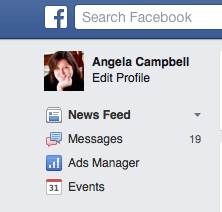
Setting up Facebook ads is very similar. Underneath your profile page, you'll see a link to "Ads Manager." Click there to begin setting up a Facebook ad.

Then you want to select Create an Ad. You'll be guided through the steps, starting with the goal of your ad, which again for me is directing people to my book link on Amazon or another retailer. So I select to direct people to a specific URL and then paste in that URL in the field it gives.

Again, you will want to target the people you want to buy your books by choosing the countries you're targeting, putting in some keywords to target people who might actually buy your books. For example, in the keyword search field, I enter Kindle, romance novels, paranormal romance, romantic suspense, romantic comedy, and pets — because each of these apply to my books, so people on Facebook who like any of these things might conceivably like my book, too.

Once you have your image selected and your budget indicated, you can start running your ad.

Speaking of images, Facebook will reject your ad if the image you associate with it has too much text on it. So while a horizontal image is ideal, you can use your book cover alone or create a small horizontal graphic that features your book cover — but without much text. Basically, just make it appealing and use a photo you own the rights to and not a picture of Henry Cavill because you want click bait. That's just wrong, and could get you sued.

Another option is dark posting on Facebook.

Mwahahaha! Sounds ominous, right? Dark posting on Facebook means publishing a post that does not appear on your page’s timeline. Instead, these posts are targeted to a select audience of your choosing.

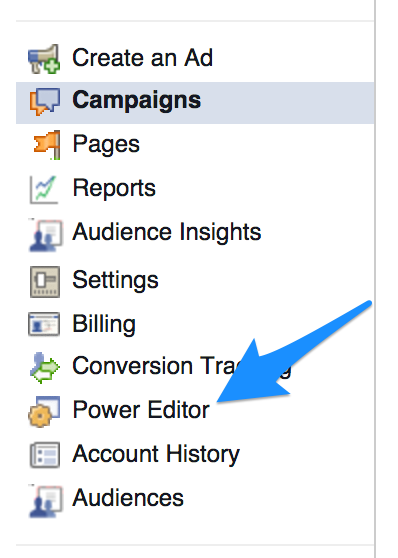
First of all, you have to be using the browser Google Chrome for it to work. If you are, go to Ads Manager and click Power Editor in the left column.

From here, you’ll want to click Download to Power Editor at the top of the page to download the accounts you want to manage.

Strata Blue has put together a list of very detailed instructions on what to do next so I'll point you to follow their instructions to try this out.


FACEBOOK INSIGHTS

I know. I know I've loaded you with a TON of information already, but I do want to stress the importance of Facebook insights if you're operating from a page and not a profile. Personally, I tend to neglect my page in favor of my profile, but you can schedule posts to run on a page and you can't on a profile (to my knowledge) so that's one thing in a page's favor.

You have to switch to your page to access Insights. Once there, simply click the Insights tab at the top of the page. You can see where most of your visitors are coming from, etc. What I find most important are the days and times my audience can best be reached. You know, since Facebook makes it so darn hard to reach people these days. These stats can help you schedule posts at the best times to get the best reach.

For example:

From this chart, I see most of my visitors visit my page on Monday around 2 p.m. ET. So if I really want to be smart and reach more people, that's when I would schedule an important post.

Again, I know it's lots of information, but hopefully some of it is at least helpful.

Until next time...


Monday, January 26, 2015

Marketing Monday: WordSwag – a Fun Way to Promote Your Book!


I totally missed getting up a post last week because of illness (darn you, flu-whatever-virus-sickened-me!) Because I'm still somewhat under the weather, I reached out to some friends and said, "Hey peeps, can you help a girl out and share some of your awesome book marketing tips?" 

More than one answered my call, and today's post comes from the very talented Jeffe Kennedy, an award-winning author whose works include non-fiction, poetry, short fiction, and novels. Her most recent works include a number of fiction series: the fantasy romance novels of A Covenant of Thorns; the contemporary BDSM novellas of the Facets of Passion, and an erotic contemporary serial novel, Master of the Opera, which released beginning January 2, 2014. A fourth series, the fantasy trilogy The Twelve Kingdoms, hit the shelves starting in May 2014 and book 1, The Mark of the Tala, received a starred Library Journal review and has been nominated for the RT Book of the Year while the sequel, The Tears of the Rose, has been nominated for best fantasy romance of the year

I shared all of that to let you know Jeffe knows her stuff, and we're very fortunate to have her here today! Take it away, Jeffe...
***

WordSwag – a Fun Way to Promote Your Book!
by Jeffe Kennedy

For my recent book release, Under His Touch, a contemporary erotic romance, I started using the WordSwag app to market the book. My lovely friend, the fabulous Megan Mulry, turned me onto using it.

You can see in this image, WordSwag is combining a quote from the book with an image. I use the app on my iPad mini (I think it cost $2.99). This is very handy because I can open the Word document of my book in DropBox, search for and copy a quote, then paste it directly into WordSwag. I’ve found it’s better to remove any special characters, because they tend to muck things up. Also, there’s a toggle for “Auto Line Breaks.” Counterintuitively (to me, at least), it works much better if that’s on.

For the image, you can take one yourself, right with the device camera, which is nice because you know you’re good on rights for it. They also have standard templates that are fair use built right in. If you use the search bar, it accesses FAR more images than show in the auto library. You can also access your camera roll from there.

While you can modify the text style on the screen where you “Double Tap to Add Text,” I prefer to do it on the page that shows both the text and image together. There are tons of styles and it’s pretty fun to try a bunch and see what works best for that particular quote and image. Setting up something for book promo – fun??? EXACTLY!

Then you can go right from there and share on Instagram, Twitter, Facebook, Tumblr, Pinterest or via text and email.

It’s a fun, eye-catching alternative to the “Buy My Book” thing we all face. It’s interesting to experiment with what quotes work best, too, for capturing attention. They have to be ones that work well out of context and create interest in knowing more. I’m still working on that part.

If anyone has suggestions or thoughts on that, let us know!

***
Previous Marketing Monday posts:

Marketing Monday: Creating short links and other Twitter stuff

Monday, January 12, 2015

Marketing Monday: Creating short links and other Twitter stuff


There's so much to discuss when it comes to book marketing that it's actually hard to pick a subject to cover each week. I mean, holy molasses, does it ever stop? Nope. Anyway. I was running out of time to get this post up, so I decided to pick a fairly basic task, something every author really needs to know how to do, and a reasonably simple thing you need to promote your books on social media. I'm talking about creating short links telling people where to purchase your books. For example, here's a sample tweet I recently put up on my Twitter account.


You'll notice (hopefully) the blue-highlighted link at the end that starts with smarturl.it. That is a short link to the real URL link http://www.amazon.com/Spirited-Away-Book-Angela-Campbell-ebook/dp/B00ME1M9AW/ref=sr_1_1?s=books&ie=UTF8&qid=1407149121&sr=1-1&keywords=spirited+away+angela&tag=smarturl-20. Long, right? On social media with character limitations, that can be a problem. Actually, twitter will automatically shorten your link for you, but I prefer to do it on my own. Why? Because I'm a control freak? Well, yeah, I am, kind of, but that's not why. There are pros to using a service such as smart url. I'll explain more below.

Now, there are a variety of services that allow you to create your own links. Which one you use is entirely up to you, and you might want to try each one to find the one you like most. I tend to use either smarturl.it and bitly.com. Here are what seem to be the three most common services used by authors:
To create a short URL, highlight and copy the URL of your book link — be it from your website, Amazon, Barnes and Noble, or whatever — and then go to any of these websites. You'll see a field where you can paste your original link. Click on create a short link, and boom. There's your short URL. Pretty intuitive and simple.

Now, I prefer Smarturl because it allows you to input various links into the same short URL, creating a universal link. Universal link? Huh? What the what? For example, when Gerard Depardieu in France clicks on the link, he will go to Amazon France while if Benedict Cumberbatch, in the UK, clicks on the same url, he will be taken to your book's page at Amazon UK. This is a feature neither bitly nor tinyurl offer, to my knowledge. Yes, it means some extra work, but in the end, it's worth it because it allows you to reach readers in different countries. You're making it easier for them to buy your book, because if Benedict Cumberbatch in the UK clicks on your link to Amazon US, he can't buy the book and would have to go to the Amazon UK site and search for it, and we both know Benedict Cumberbatch has better things to do with his time, right? Also, if Benedict Cumberbatch clicks on your link, massive high five, because that's just cool. Anyway.


I recommend registering for a free account with manage.smarturl.it before you start, so that all of your links will be saved and accessible for later use or adjustment. SmartUrl also keeps track of how many times your short link is clicked on, which can be helpful. Actually, bitty will also show you the number of clicks, and tiny url might, too — I'm not sure on that one. Point is, create an account to see analytics.

Once you have your account created, click on CREATE smartURL. You'll see a field for "default URL" link, which is where you should put your primary link. For me, since I'm in the United States, my primary link would default to Amazon US's link for my book. The primary link is entirely your decision. 

Next, you'll see a field for "Country Destinations." This is where extra work is required. If your book is listed on Amazon UK, but you're in the US, you'll have to go to the Amazon UK website, copy and paste the link for your book, and then paste it into this field, along with the name of the country. Amazon has websites specific to many countries — Amazon.ca is Amazon Canada, Amazon.fr is Amazon France, Amazon.de is Amazon Germany, Amazon.es is Amazon Spain, Amazon.co.uk is Amazon UK, and Amazon.com is Amazon US. I recommend visiting each, and if your book is available for purchase on any of them, adding it to your Smarturl for that book. A complete list of all of the Amazon websites can be found here: http://www.amazon.com/gp/feature.html?ie=UTF8&docId=487250.

Remember how I mentioned analytics earlier?

It's a good idea to review your tweet analytics whenever you get a chance. It can help determine if your tweets are worded in a way that is driving people to learn more about your books. With that in mind, I recommend anyone using Twitter take advantage of Twitter analytics, too. Simply go to https://analytics.twitter.com. It's free! You can see how many people have clicked on your links, etc.

I hope you find this information helpful. Still have questions? Recommendations on other shortening services? Let me know in the comments.

As always, thanks for reading.


PREVIOUS POSTS:

Marketing Monday: Some tips on gifting books to readers

What new authors need to know, but no one usually tells them

Monday, January 5, 2015

Marketing Monday: Some tips on gifting books to readers


Happy Monday! I know. No such thing.


Still, as I said in my last post, I've decided to dedicate this day on my blog to sharing some marketing tips for authors selling books. Some I've learned, usually the hard way, or I'll invite my friends to share tricks they've learned. In case you missed it, my blog post titled "What new authors need to know but no one ever tells them" is one of the most popular posts I've ever written. I figure this either means lots of aspiring and new authors found the information really helpful or those pesky Internet bots really like that title. Either way, eh, why not? Please do keep in mind that the following tips are based on my own experiences and always subject to change over time.

For my inaugural post, I thought I'd share some tips on getting your books to readers. You've written a book. High-five yourself! But how do you get it into the hand of readers? Word-of-mouth is a powerful way to sell books, so you might want to gift copies of your books to readers in advance of or soon after its release to spur hype. Lots of authors will gift copies to readers via contests. Awesome, right? But, uh, how do they do it, you might be wondering. Obviously, if you have a paperback, you can simply pop it into the post and off it goes, but ebooks are a whole other ballgame.

If you're being published by someone other than yourself, it's a good idea to check your contract to see if your publisher has placed any limitations on the number of ebooks you can legally gift to others. Not all publishers include a limit, but many do.

And, here's some technical mumbo jumbo to consider. There are a number of ways to gift copies of your ebooks to readers, but you should really think twice before simply emailing a copy to anyone. Unfortunately book piracy is a thing, and it's a bad, bad thing for your sales. Don't be surprised if you email a copy of your ebook to someone and then find it on Pirate Bay a month later. DRM (Digital Rights Management) is encoded on most ebooks by publishers and book retailers to make it difficult to share ebooks with others. But unfortunately, even ebooks purchased from sites such as Amazon can be redistributed by people who figure out how to break the DRM coding on it. And if you receive an advance ebook copy from your editor or publisher prior to its release, it's probably not encoded with a DRM yet.

First, you'll need final, approved copies of your ebooks to send. Generally, your editor or publisher will send these to you months before your publication date so that you can contact potential reviewers and, yes, give away to readers through contests. There are generally three formats you can or will receive: PDF, epub, and Mobi. It's important to note that not all ereaders can read the same format. If you're gifting a copy of your ebook to a reader, be sure to ask which type of device they have. That will determine your next step. Kindles accept only Mobi and PDF files. Nooks and Kobos accept only epub and PDF files.

You have options when it comes to gifting ebooks to readers:

  1. Purchase the ebook from a retailer such as Amazon and have it delivered directly to your recipient. 
  2. Email the ebook to your recipient.
  3. Send the ebook directly to the recipient's device yourself.

There are pros and cons to each.

Purchasing the ebook from a retailer is an easy option, as it guarantees the ebook will be delivered with DRM coding and decreases the risk of piracy. However, it obviously costs you money, and Amazon, in particular, might prevent the recipient from posting a rating or review of the book because it will associate your account with the gifted ebook and assume the recipient is a biased friend. One possible workaround is to gift the ebook from an Amazon account NOT associated with your Amazon Author profile (which you really should have). But you'll still be out of pocket for the cost of the book.

Emailing the book to your recipient is easy, but you run a serious risk of piracy. Enough said.

Sending the ebook directly to the recipient's device is also easy, costs you nothing out of pocket, and decreases the risk of piracy (although a really tech-savvy person would still be able to pirate it, you're making it harder for them).

So I recommend the third choice, and here's how to do it.

For a Kindle, you'll have to ask the recipient for their Kindle email address. They can find this by logging into their Amazon account and selecting “Manage Your Content and Devices.” Click on “Settings” and scroll down to find their Kindle’s email address.

You'll need a copy of your book in Mobi format. Your publisher should be able to send it to you in that format, but if they don't, I recommend you download a free program called Caibre. It will convert epubs into Mobi or PDF files. You can also send directly from Calibre, or you can open your email, insert the recipient's Kindle address into the send to field, attach your Mobi file, and hit send. And you're done.

So what if your recipient has a Nook or Kobo?

Unfortunately, neither of those seem to yet have a "send to" feature like the Kindle, but there are workarounds if your recipient is willing. For example, Nook owners can install the Kindle app on their device. Simply follow the directions above once they've installed the app.

Kobo owners can acquire the epub files using the app Grab My Books.


I know. You're probably thinking this sounds really complicated and way too hard and why can't you just write books and leave this stuff to the Promo Fairies. I hate to break it to you, but YOU are the Promo Fairies.

Trust me. It's easier than it sounds, and once you do it a couple of times, it'll be a piece of cake.

So there's a lot of information. Questions? Need clarification? Hit me up in the comments below.

Monday, December 29, 2014

Setting goals for the new year

First of all, I hope everyone had a wonderful holiday and is entering the new year with many blessings.

I wanted to do a post before the end of the year thanking everyone who has purchased a copy of any of my books. I do donate part of my author royalties to my local animal shelter, and I wanted to give an update on that, since I know I've been amiss in doing so and some of you might be wondering if I've kept true to my promise. I don't have an exact figure because I suck at accounting and bookkeeping and all the financial things, but after attempting to come up with a figure this past weekend, I estimate I have donated approximately $800 to Greenville County Animal Care so far. That includes all of the pet food, pet supplies and other donations including money I've used to sponsor animals on the euthanasia list. A huge thank you also to my couponing, sales savvy best friend who helped me gather twice the donations I would have done otherwise, and for being my delivery person in getting them to the shelter more often than not. And, from the bottom of my heart, thank YOU for taking a chance on my books. I know there are a lot of great reads to choose from, but I sincerely appreciate the opportunity to use what I love to give back to a cause I believe in. I like to think that together we've saved a few lives this year. Let's help save some more in 2015, okay?

*High fives!!* 


Looking ahead ...

I really try not to do resolutions because I think they're a bunch of rubbish, but since I've been struggling to stay motivated lately, I thought, "Eh. Why not?" But rather than making resolutions I know myself well enough to know I'll never keep — lose weight (bahahahaha), get in shape (BAHAHAHAHA), etc. — I'm keeping these resolutions strictly geared to my writing. And I'm only making two of them, so that should be easy to keep, right? Gulp.

No. 1 – Marketing Mondays for Writers

I suck at book promotion. Really, I do. But so do most writers, I think. So I thought I'd start a feature here on my blog where, each Monday, I share some promotion tips I've learned that kind of, sort of do work for me, and I might invite some of my more successful author friends to share advice, too. Why? Because I've lost track of how many times on forums, in writer's groups, and in chats I've seen new writers (and even experienced ones) ask for help because they are completely clueless about selling their books. And I'm all about paying it forward and even though I suspect I know as much about book marketing as my cat Dusti, maybe I know more than that poor lady bawling over her keyboard in Fill in the Generic Location because she doesn't even know where to start. And the fact that my post for new writers is one of the highest-trafficked posts on my blog EVER, I think there's a need for it. We'll see.

No. 2 – Finish Connor's book

This one is to keep me in gear, guys. I'm still working on the fourth book in my psychic detectives series, but I'm also working on another project now that could be brilliant or a complete disaster. My lovely editor had asked me a while back to consider writing a novella from the points of view of Abbott and Costello and Charlie. I made no promises, but the idea intrigued me enough that I've decided to give it a try and see what happens. Fingers crossed.

That's it! Pretty simple, huh?

Again, I want to thank anyone who has taken the time to read this, buy any of my books, or write a review for any of my stories. I hope each and every one of you has a great New Year's Eve!

Mwah!

Friday, December 5, 2014

Fun Friday Q&A with author Debbie Johnson!

Debbie Johnson
I love Christmas, and I love reading books with a Christmas theme this time of year. I mean, who doesn't, right? I'm super excited to have author Debbie Johnson on my blog today to discuss her new book, "Cold Feet at Christmas," which is not only now available from Harper Impulse but doing very well in the ranking on Amazon UK (we're talking No. 1 in romantic comedy right now, folks)! Go, Debbie!

Angela: Thanks for stopping by today, Debbie. Tell us about your new book.

Debbie: It starts with a very unromantic situation – our heroine, Leah, running away from her Christmas Eve wedding in Scotland, after finding her fiance playing ‘hide the sausage’ with her bridesmaid! Understandably taken aback by the situation, she drives off into the wilderness in the middle of a blizzard – ending up stranded in the middle of a very snowy nowhere! After staggering across a frozen field in nothing but her wedding dress and her Jimmy Choos, she spies an isolated stone cottage – inhabited by a man so divinely handsome she thinks she’s died of hypothermia and gone to heaven…

Angela: Why should readers pick up a copy?

Debbie: It’s pure escapism – funny, sweet, romantic, and moving, with lashings of super-hot sex! Plus, you know, Christmassy!

Angela: Sounds awesome. Where did you get the inspiration for this story?

Debbie: Walking the dog in a snowstorm, and realising how it obliterated the rest of my reality – I could have been anyone, anywhere. And then I added in the ‘what ifs…’

Angela: Let’s get to know you a little better: What’s your dream vacation destination?

Debbie: If I was with my kids, then Florida. If I was with a fellow grown-up, New York!

Angela: What book do you most recommend to others?

Debbie: This is impossible to answer! I love crime fiction, and always tell people to read James Lee Burke and John Connolly. But for romance, if I had to pick one, it’d be Nora Roberts and J.D Robb – and a they’re the same person, I get two for the price of one!

Angela: If you could have any super power, what would it be and why?

Debbie: Flying. I know it’s not that practical, or the most profitable, but I would just love to experience it. But ideally without an Iron Man suit or jet pack! I’d actually like retractable wings!

Angela: Thank you for stopping by, Debbie! Learn more about her and her books by visiting www.debbiejohnsonauthor.com. Better yet, buy "Cold Feet at Christmas" after reading the synopsis:

Running out on your wedding shouldn’t be this much fun! 
A remote Scottish castle on a snowy Christmas Eve. A handsome husband-to-be. A dress to die for. It should have been the happiest day of Leah Harvey’s life – but the fairytale wedding turns sour when she finds her fiancĂ© halfway up the bridesmaid’s skirt just hours before the ceremony! 
Fleeing the scene in a blizzard, Leah ends up stranded at the nearest cottage, where she collapses into the arms of its inhabitant – a man so handsome she thinks she must have died and gone to heaven! 
And when Rob Cavelli suddenly finds himself with an armful of soaking wet, freezing cold, and absolutely gorgeous bride on the run, he’s more than happy to welcome her into his snowbound cottage this Christmas…

LinkWithin

Related Posts Plugin for WordPress, Blogger...